Features

AI Reports and Insights

Generate financial reports directly from your myDATA records and reconciliation history — exportable, auditable, and ready to share with clients or stakeholders.

AI Reports and Insights — product view
AI Reports and Insights — detail view

Insights & Analysis

Ask anything about your financial data

TaxLayer connects every dimension of your business — revenue, expenses, tax, balances, customers, and suppliers — into one queryable model. Ask questions in plain language and get answers in seconds.

LIVE KPIS

Know where any entity stands in ten seconds

Revenue, growth, customer concentration, cost-to-revenue, EBITDA proxy, VAT position and more — computed live from the myDATA books, for your own organisation or any client you manage. The health read before a meeting, without opening the ERP.
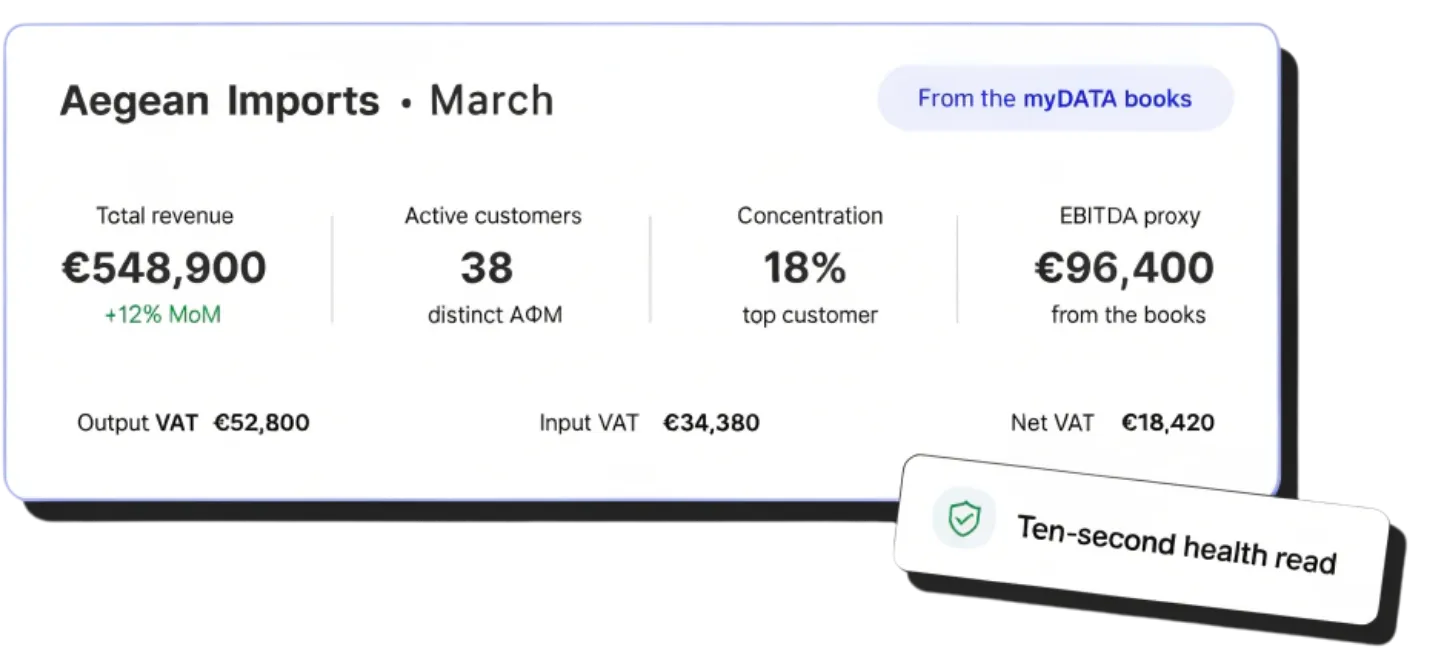
A March health read for Aegean Imports from the myDATA books — total revenue up 12% month on month, active customers, top-customer concentration, EBITDA proxy, and output, input and net VAT — a ten-second health read

LISTS

Set it once. Watch it update itself, forever

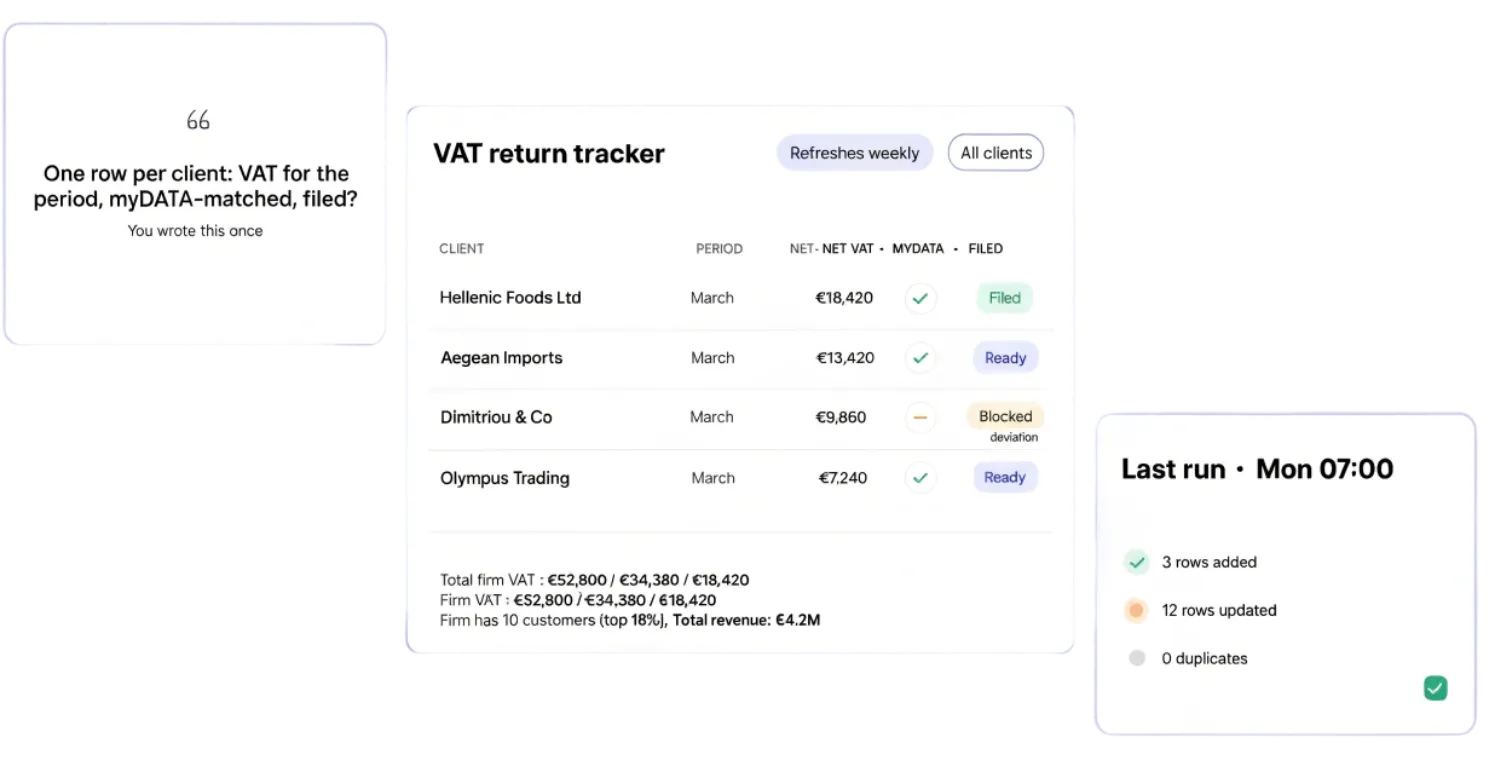
Define the objectives, point at your sources, and write the goal in plain language. The table you rebuilt in Excel every month becomes standing infrastructure.

A VAT return tracker list defined once in plain language — one row per client with period, net VAT, myDATA match and filing status — refreshing weekly across all clients, with a last-run card showing rows added and updated and zero duplicates

AI REPORTS

Spin up a report from anywhere in TaxLayer — just by asking

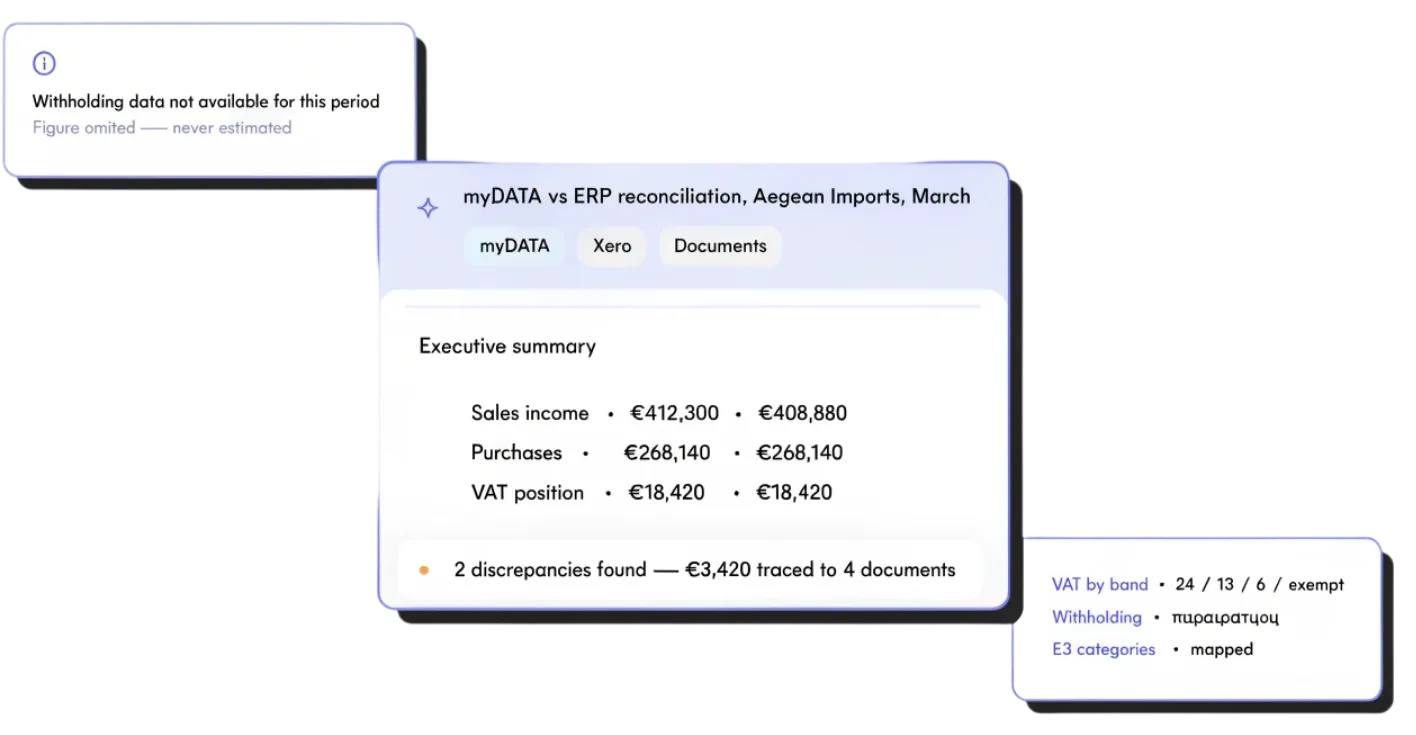
Describe what you need — a VAT position, a quarterly health summary, a myDATA-vs-ERP reconciliation. If a figure isn’t in the data, it says so. The afternoon of pull-and-write becomes a minute.

An AI-generated myDATA vs ERP reconciliation report for Aegean Imports in March — executive summary comparing sales income, purchases and VAT position, two discrepancies traced to four documents, VAT by band and E3 categories mapped — with a note that withholding data was omitted rather than estimated

CHAT

Ask the numbers a question, get a straight answer

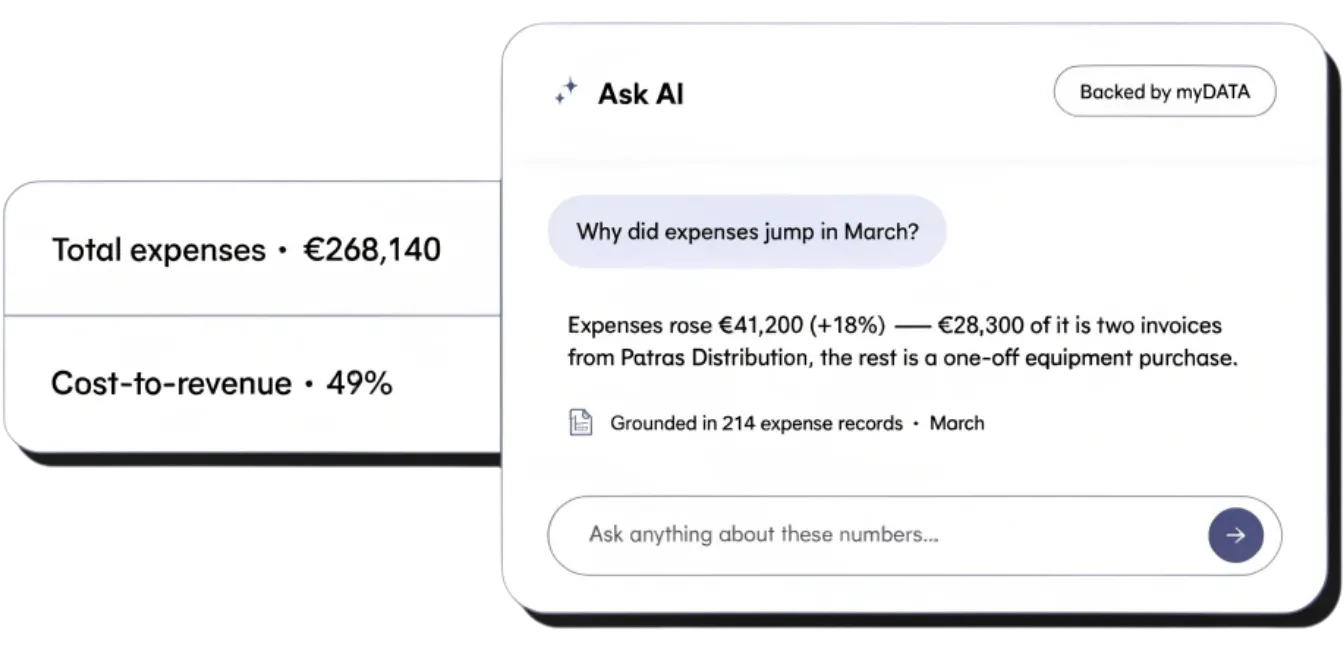
“Why did expenses jump in March?” “Which customer drove the growth?” The chat answers about the exact figures on screen — its context is built from the same books, so it can’t drift into fiction. Interrogate any tile instead of exporting to Excel to find out.

An Ask AI chat backed by myDATA answering “Why did expenses jump in March?” — expenses rose €41,200, mostly two Patras Distribution invoices plus a one-off equipment purchase — grounded in 214 expense records, beside total expenses and cost-to-revenue tiles

Frequently asked questions

What kinds of reports can I generate?

Anything you can describe in plain language — VAT positions, withholding tax exposure, customer concentration, expense breakdowns, ERP vs. myDATA discrepancies, year-on-year comparisons, supplier payment timing. If the data is in your ERP, AADE myDATA, your bank or your reconciled ledger, you can build a report on it.

Where do the numbers come from?

Every report pulls directly from your ERP, your AADE myDATA records and your reconciled ledger — never reconstructed or estimated. The AI writes the narrative around your real numbers, with every figure traceable back to its source document.

What’s the difference between a view and a report?

A view is a saved live filter or dashboard — open it any time and the numbers reflect right now. A report is a narrative deliverable, generated for a specific period or question, and exportable. Use views to monitor day-to-day; use reports to share, present or file.

Can I share reports with my clients?

Yes. Publish a report to a client’s portal and they see only their own — alongside their Money In, Money Out and VAT dashboards. Access is scoped to their workspace and revocable any time.

Can my team collaborate on the same report?

Yes. Comment, refine, edit and approve together. Everyone sees the same live numbers, the same chat history and the same change trail — so partners, seniors and analysts work in one place instead of across email and Slack.

Can I export and share reports outside TaxLayer?

Export any report to PDF, PNG or PPTX in clicks — or share a live link if you want recipients to see the latest version. Tables, charts, the AI narrative and the underlying numbers all travel with the export.

Do reports update themselves?

Saved views and scheduled reports refresh as new documents land and periods roll over. Set the cadence and the audience once — leadership gets monthly close summaries, clients get weekly VAT positions, stakeholders get quarterly KPIs — and TaxLayer handles the rest.

Can I ask questions in Greek?

Yes. Reports, the AI chat and natural-language refinement all work in Greek and English — and answers come back in whichever language you asked in. Switch mid-conversation if that helps.

Month-end, without the grind.

Say goodbye to the tedious back office tasks of manual documents gathering.